
Jump to content
View in the app

A better way to browse. Learn more.

BRICKPICKER

A full-screen app on your home screen with push notifications, badges and more.

To install this app on iOS and iPadOS
  1. Tap the Share icon in Safari
  2. Scroll the menu and tap Add to Home Screen.
  3. Tap Add in the top-right corner.
To install this app on Android
  1. Tap the 3-dot menu (⋮) in the top-right corner of the browser.
  2. Tap Add to Home screen or Install app.
  3. Confirm by tapping Install.

Leaderboard

Popular Content

Showing content with the highest reputation on 01/05/2026 in all areas

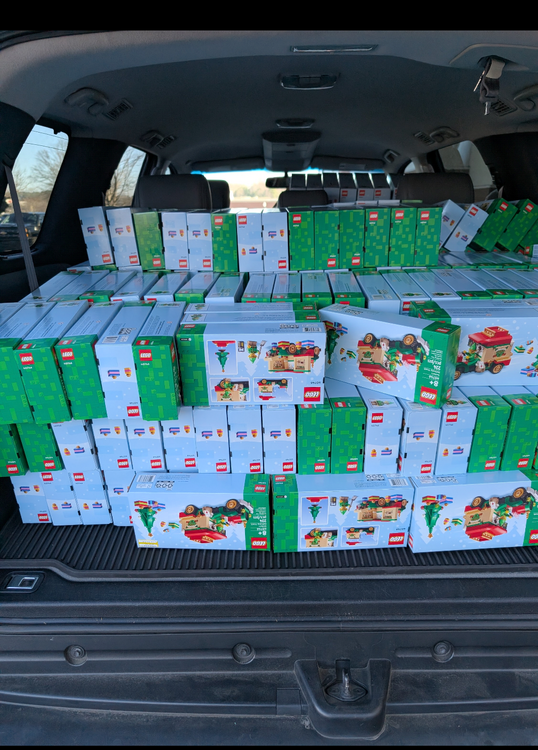
  1. 385 delivery trucks at 5.99 from one store. Bought about 300 at 9.99 and another 100 when 13.99 and 15.99. Few more and can build life size truck. Just in time for the retiring tag to come off along with sleigh and tree.
  2. They weren't on the updated late list I saw. Also noticed the tags came off those 3. Can't see them retiring a set that sold many.

Configure browser push notifications

Chrome (Android)
  1. Tap the lock icon next to the address bar.
  2. Tap Permissions → Notifications.
  3. Adjust your preference.
Chrome (Desktop)
  1. Click the padlock icon in the address bar.
  2. Select Site settings.
  3. Find Notifications and adjust your preference.