Jump to content
View in the app

A better way to browse. Learn more.

BRICKPICKER

A full-screen app on your home screen with push notifications, badges and more.

To install this app on iOS and iPadOS
  1. Tap the Share icon in Safari
  2. Scroll the menu and tap Add to Home Screen.
  3. Tap Add in the top-right corner.
To install this app on Android
  1. Tap the 3-dot menu (⋮) in the top-right corner of the browser.
  2. Tap Add to Home screen or Install app.
  3. Confirm by tapping Install.

Featured Replies

2 hours ago, legodad74 said:

Similar situation here with Macy’s. I ordered 6 sets around 8:30am Sunday.  One set was delivered Tuesday, a second delivered yesterday.  The other 4 show a UPS shipping label was generated Monday at 7:36pm, and the UPS tracking shows still awaiting the package.  I’m growing convinced this is a case of something in the process “broke” and the warehouse/store will never complete processing (hand off to UPS).  What’s even more annoying is 2 of the 4 items are still showing as in stock on Macy’s.com.  I plan to reach out to customer service later today but doubt it will lead to anything positive.  

Update: looks like the hand off to UPS occurred an hour or so ago, UPS finally shows in possession with a specific delivery date!

  • Replies 12.2k
  • Views 1.9m
  • Created
  • Last Reply

Top Posters In This Topic

Posted Images

1 minute ago, skiizim said:

This is why I hate Macy’s!!!! I wish they wouldn’t ship in these bags.

IMG_2057.jpeg

IMG_2058.jpeg

You win some you lose some with Macys, also then you lose some 

Been pretty impressed with Macy's. Only order in 12's and they come perfectly packed every time.  I was pleasantly surprised.

20 minutes ago, ravenb99 said:

Been pretty impressed with Macy's. Only order in 12's and they come perfectly packed every time.  I was pleasantly surprised.

I’m at about 70% successful, better with ship to store, almost always in boxes.

40 minutes ago, Billy Brick said:

I’m at about 70% successful, better with ship to store, almost always in boxes.

That’s what I should of done, I have two stores that I’m sandwiched between less than 7 miles from me.

If any of you had orders cancelled at Macys, I suggest checking to see if items came back in stock. I had success resubmitting my order with the original purchase price, plus I got the Geoffrey plush.

4 wm orders delivered today by lasership and they all smell strongly of weed. 2nd time in a week, first time i left the box outside to air out. the bar must be really low out there for drivers. explains their delivery van, i just thought they were big movie buffs

image.thumb.jpeg.2d26d3e088d2a6303beb9ba5e2f7335f.jpeg

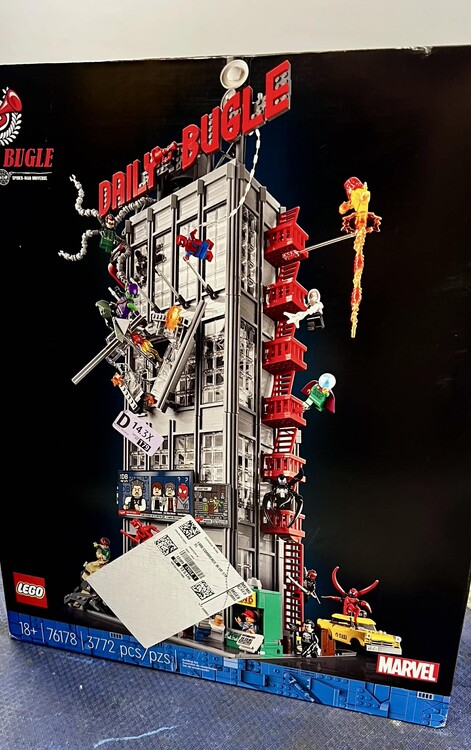
Received 8 different shipments today.  Enough to spark three comments.

1. LEGO is sending Bestseller PAB parts  mixed with orders now.  I've always had them come separately, no matter bestseller or standard.
2. For those wondering, I received a $200 standard PAB order and was NOT charged a customs fee in the US.
3. Finally, thanks Amazon!  Keep up the good work.  We love you!


bugle.jpg

Edited by raindog

I had something very odd happen today. Over the Black Friday week, I placed a lot of LEGO PAB orders, dividing them out to get gwps. On every single order, I had the order sent to my business address instead of my home where I normally receive PAB orders. This is due to me being out of town a lot in December. Last week, I received my first Standard (long-time) orders at work. Today, I received three different Standard orders at my home address even though I asked for them to be sent to my work address. I checked with LEGO to ensure that it wasn't my mistake. Many orders were mixed, with both parts and sets in the same order. The sets all went to the correct address.

I can only think of a few reasons why this might have happened:

  1. I use my home address for my credit card, even when sending to work. But again, I'll point out that the sets all found their way to the proper address.

  2. Since I have ordered parts many times before, my name brought up my home address when they addressed the package in the parts warehouse.

  3. It has something to do with tarrifs being paid.

Any other ideas? Anyone notice the same thing?

2 minutes ago, raindog said:

I had something very odd happen today. Over the Black Friday week, I placed a lot of LEGO PAB orders, dividing them out to get gwps. On every single order, I had the order sent to my business address instead of my home where I normally receive PAB orders. This is due to me being out of town a lot in December. Last week, I received my first Standard (long-time) orders at work. Today, I received three different Standard orders at my home address even though I asked for them to be sent to my work address. I checked with LEGO to ensure that it wasn't my mistake. Many orders were mixed, with both parts and sets in the same order. The sets all went to the correct address.

I can only think of a few reasons why this might have happened:

  1. I use my home address for my credit card, even when sending to work. But again, I'll point out that the sets all found their way to the proper address.

  2. Since I have ordered parts many times before, my name brought up my home address when they addressed the package in the parts warehouse.

  3. It has something to do with tarrifs being paid.

Any other ideas? Anyone notice the same thing?

My guess is tariffs, lego consolidating to save money. Amazon has been doing it for a long time, now that Lego has all the data it's just a matter of time probably. Interesting

Join the conversation

You can post now and register later. If you have an account, sign in now to post with your account.
Note: Your post will require moderator approval before it will be visible.

Guest
Reply to this topic...

Recently Browsing 0

  • No registered users viewing this page.

Configure browser push notifications

Chrome (Android)
  1. Tap the lock icon next to the address bar.
  2. Tap Permissions → Notifications.
  3. Adjust your preference.
Chrome (Desktop)
  1. Click the padlock icon in the address bar.
  2. Select Site settings.
  3. Find Notifications and adjust your preference.