
Jump to content
View in the app

A better way to browse. Learn more.

BRICKPICKER

A full-screen app on your home screen with push notifications, badges and more.

To install this app on iOS and iPadOS
  1. Tap the Share icon in Safari
  2. Scroll the menu and tap Add to Home Screen.
  3. Tap Add in the top-right corner.
To install this app on Android
  1. Tap the 3-dot menu (⋮) in the top-right corner of the browser.
  2. Tap Add to Home screen or Install app.
  3. Confirm by tapping Install.

My attempt to redesign the Lego brick and Lego System to make it better...

Featured Replies

Some of you may know that I've undertaken a "30 day Lego challenge" where I'm trying to build a model or do a project to better understand the Lego system nearly every day for 30 days...  
 
In this project I did some experiments to better understand the relative proportions of the width of a brick to it's height, the width of a stud, the thickness of the wall of a brick and other relevant proportions.  Overall, the system works well, but it is a bit weird. (ex: Why did they decide to make bricks taller than they are wide anyways!?)
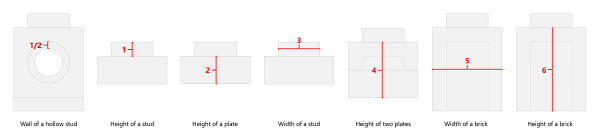
 
Lego-Units-summary-sm-600x135.png
 
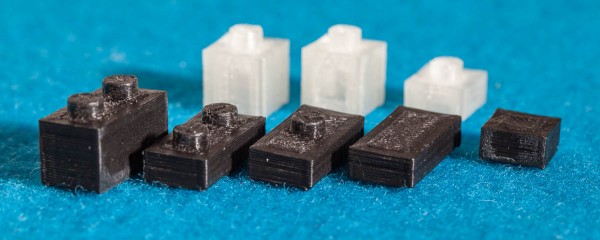
As such, I decided to "redesign" the Lego brick to eliminate some of the quirks of the system while making building techniques which I like easier to achieve (ex: offsetting bricks).  I designed the new bricks in CAD software, and even printed a few on a 3d printer.
 
IMG_4038-600x240.jpg
My 3d-printed bricks based on a new design...
 
In doing so, I discovered some new challenges, but I think the project will be interesting to people on this forum.
 
 
Let me know if you think this is interesting, or have further ideas...
 
Sincerely,
---tom

The Lego brick is already an item of perfection, fitting perfectly and..... it is my preciousssssssssss.

No honestly, I am very interested in seeing your results.

That image of those 3D printed elements should be posted in any thread where people worry about 3D printing ruining lego investing.

Join the conversation

You can post now and register later. If you have an account, sign in now to post with your account.
Note: Your post will require moderator approval before it will be visible.

Guest
Reply to this topic...

Recently Browsing 0

  • No registered users viewing this page.

Configure browser push notifications

Chrome (Android)
  1. Tap the lock icon next to the address bar.
  2. Tap Permissions → Notifications.
  3. Adjust your preference.
Chrome (Desktop)
  1. Click the padlock icon in the address bar.
  2. Select Site settings.
  3. Find Notifications and adjust your preference.
