Jump to content
View in the app

A better way to browse. Learn more.

BRICKPICKER

A full-screen app on your home screen with push notifications, badges and more.

To install this app on iOS and iPadOS
  1. Tap the Share icon in Safari
  2. Scroll the menu and tap Add to Home Screen.
  3. Tap Add in the top-right corner.
To install this app on Android
  1. Tap the 3-dot menu (⋮) in the top-right corner of the browser.
  2. Tap Add to Home screen or Install app.
  3. Confirm by tapping Install.

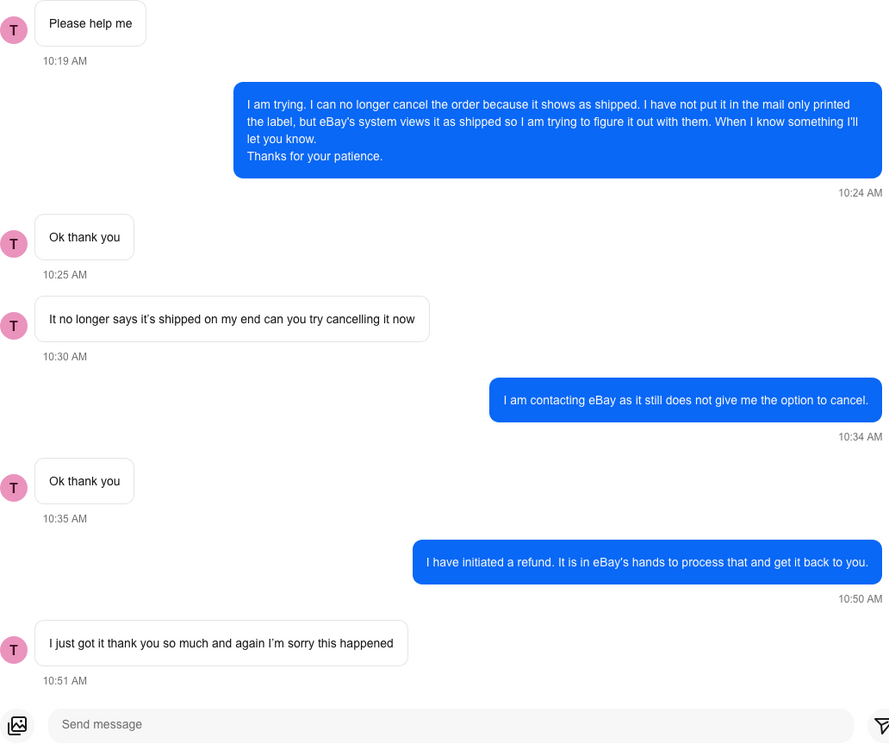
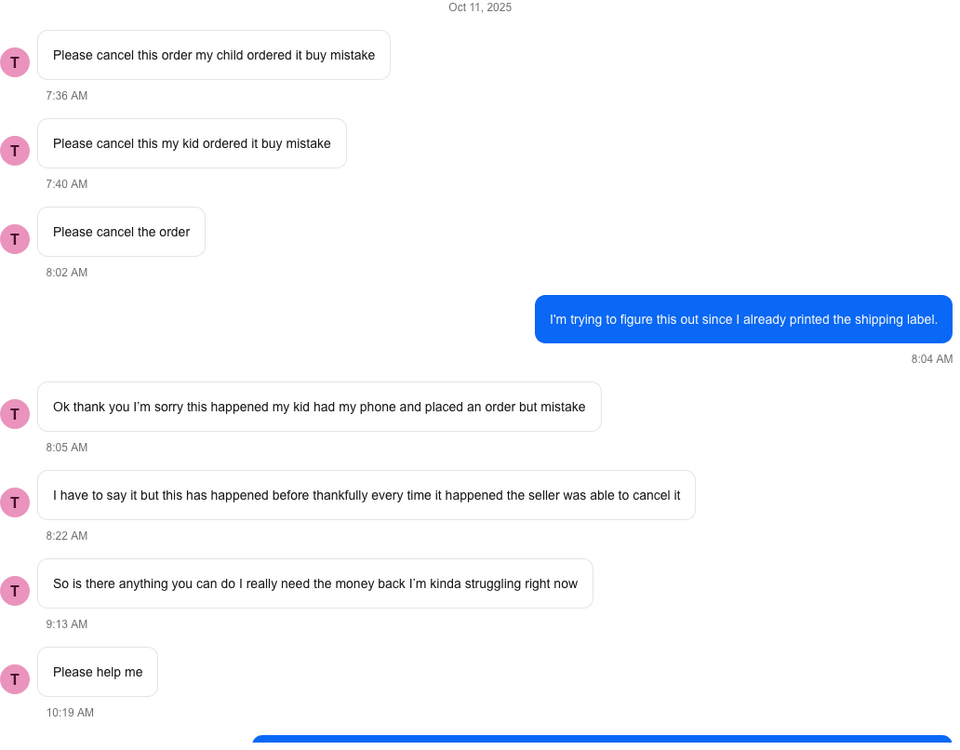
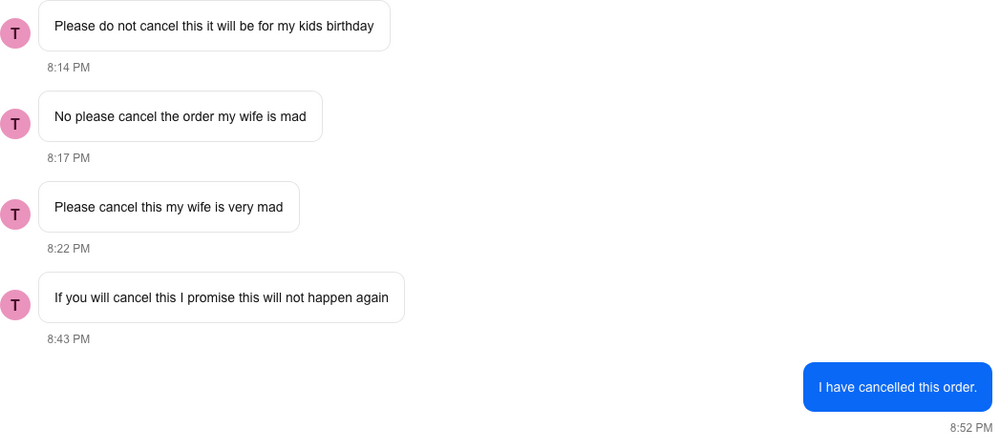
Are fruitcakes running rampant on eBay lately? Selling, buying, listing, feedback, etc...

Featured Replies

10 hours ago, thelovemachine said:

Not sure how to delete this post.  I looked up answer for my own question!.  when item is damaged during shipping, seller refunds 100% including shipping!

It was kind of annoying as I sold something in same state but it traveled to ten locations and likely got tossed around by USPS first class.

That is one reason why I typically use Priority mail - insurance is included.  If you pay for postage through ebay, it is $100 insurance.  If you buy @ USPS it is only $50 insurance.  Of course, if it goes over $100, you have to pay for all of the insurance, it isn't pro-rated. 

Even if the person chooses first class shipping, with the ebay shipping discount the priority shipping is still usually about the same cost to me.  Even if it is a few pennies more than first class or ground, the free insurance is totally worth it.

  • Replies 7.2k
  • Views 955k
  • Created
  • Last Reply

Top Posters In This Topic

Most Popular Posts

  • jaisonline
    jaisonline

    one of my best ebay message exchanges ever. we can't even make this stuff up.  total fruitcake. happened 3 months ago.   i was the buyer for a diagon alley set. - Sent by me at 7:47pm. "Hi

  • tasiatunes
    tasiatunes

    UPDATE EBAY RETURNED ALL MY FUNDS AND SIDED WITH ME THE SELLER.

  • msdontplay01
    msdontplay01

    Update to this crazy story.  Of course the buyer never returned the item and never sent any documentation verifying they received their package with rat feces inside.  I called eBay

Posted Images
When I get the same "What's your bottom price?" messages for five of my listings, and I go to add the user to my blocked buyers list, and he's already there. :lol:

Got an email from eBay today about my active listings "Your listings can now accept offers to attract more buyers" and in the body of the email, it has this "If you don’t want to receive offers, go to manage offer settings to update your preference."

When in the heck did this start? Now I have to go into each of my listings and revise them to turn off the best offer functionality? I found the below post in the eBay Community. Is it true I can't turn this feature off?

It is actually worse than that.  I have a Buy-it-Now listing that's scheduled to run 30 days.  I unchecked the "Accept Offers" box when I created it, but about a week after listing, eBay sent me a message saying they had turned it back on.  I went into my listing and turned it off, and 2 days later, they sent me another message saying they'd turned it back on!  I contacted eBay customer support and asked them "How do I disable this?  If I wanted to accept offers, I would have selected that in the first place".  She said "you can't - there is no way to turn it off".  It is apparently something new they're trying, but if they get enough negative feedback, they will either abandon it, or at least offer some kind of account setting to disable it.  So everybody who doesn't like losing control over your listings, complain, complain, complain!


Edited by oneknightr

1 minute ago, oneknightr said:

When in the heck did this start?

A long time ago... can't do anything about it. It's very annoying, I know.

2 minutes ago, oneknightr said:

Now I have to go into each of my listings and revise them to turn off the best offer functionality?

Yup.

8 minutes ago, elmaslıefendi said:

A long time ago... can't do anything about it. It's very annoying, I know.

Yup.

I guess that shows how long of a hiatus I took from selling. Thanks for confirming!

2 hours ago, oneknightr said:

Got an email from eBay today about my active listings "Your listings can now accept offers to attract more buyers" and in the body of the email, it has this "If you don’t want to receive offers, go to manage offer settings to update your preference."

When in the heck did this start? Now I have to go into each of my listings and revise them to turn off the best offer functionality? I found the below post in the eBay Community. Is it true I can't turn this feature off?

It is actually worse than that.  I have a Buy-it-Now listing that's scheduled to run 30 days.  I unchecked the "Accept Offers" box when I created it, but about a week after listing, eBay sent me a message saying they had turned it back on.  I went into my listing and turned it off, and 2 days later, they sent me another message saying they'd turned it back on!  I contacted eBay customer support and asked them "How do I disable this?  If I wanted to accept offers, I would have selected that in the first place".  She said "you can't - there is no way to turn it off".  It is apparently something new they're trying, but if they get enough negative feedback, they will either abandon it, or at least offer some kind of account setting to disable it.  So everybody who doesn't like losing control over your listings, complain, complain, complain!


So, I noticed this last year and was super annoyed by it, but my listings this year haven't had this happen. Now, many of my listings haven't lasted very long, but I have a couple that have been up for over a month, and the "Best Offer" feature hasn't turned on. In January, I reached "Top Rated" status, so I wonder if that had anything to do with it...? 

6 hours ago, oneknightr said:

Got an email from eBay today about my active listings "Your listings can now accept offers to attract more buyers" and in the body of the email, it has this "If you don’t want to receive offers, go to manage offer settings to update your preference."

When in the heck did this start? Now I have to go into each of my listings and revise them to turn off the best offer functionality? I found the below post in the eBay Community. Is it true I can't turn this feature off?

It is actually worse than that.  I have a Buy-it-Now listing that's scheduled to run 30 days.  I unchecked the "Accept Offers" box when I created it, but about a week after listing, eBay sent me a message saying they had turned it back on.  I went into my listing and turned it off, and 2 days later, they sent me another message saying they'd turned it back on!  I contacted eBay customer support and asked them "How do I disable this?  If I wanted to accept offers, I would have selected that in the first place".  She said "you can't - there is no way to turn it off".  It is apparently something new they're trying, but if they get enough negative feedback, they will either abandon it, or at least offer some kind of account setting to disable it.  So everybody who doesn't like losing control over your listings, complain, complain, complain!


This only happens to me when I list on my phone through the app.  If I go through my iPad or desktop, it stays where I set it. (Crosses fingers this continues...) I think some people have said to start the listing on the phone, take the pictures, then finish on another device.

11 hours ago, Brystheguy said:

This only happens to me when I list on my phone through the app.  If I go through my iPad or desktop, it stays where I set it. (Crosses fingers this continues...) I think some people have said to start the listing on the phone, take the pictures, then finish on another device.

Thanks for the tip! My listings were done on my phone. I'll use my desktop next time and see what happens after a week.

So I had a guy with 0 feedback.  The set was sent back to me for wrong house number.   So I told the guy. He said to reship he’s willing to pay but he didn’t change the address. He said he never had issues with eBay but he’s 0 fredback. I told him I can’t ship again until he changes it I’m ebay. So do I refund him minus original shipping? How do I get fvfee back. It shouldn’t be hard to change eBay address but I’m thinking I just refund 

Just now, thelovemachine said:

So I had a guy with 0 feedback.  The set was sent back to me for wrong house number.   So I told the guy. He said to reship he’s willing to pay but he didn’t change the address. He said he never had issues with eBay but he’s 0 fredback. I told him I can’t ship again until he changes it I’m ebay. So do I refund him minus original shipping? How do I get fvfee back. It shouldn’t be hard to change eBay address but I’m thinking I just refund 

I could be wrong tho but I think to get your ebay fee back you have to get ebay involved (ie open a case) before refunding the buyer.


Buyers that buy an item and then message straight away that they weren't aware an item was incomplete, even though the title states "Incomplete", and listing description states in "Incomplete".

Not even worth messaging buyer back, just do a cancellation request and add buyer to blocked list. Guess one positive is rather refund now than wait for buyer to act surprised when item is delivered and claims items are missing.

Still annoying that sellers need to eat the paypal fee, as it is removed from the refund amount automatically, even though it is a small amount, it adds up over time (30p).

19 minutes ago, Voltron said:

Buyers that buy an item and then message straight away that they weren't aware an item was incomplete, even though the title states "Incomplete", and listing description states in "Incomplete".

Not even worth messaging buyer back, just do a cancellation request and add buyer to blocked list. Guess one positive is rather refund now than wait for buyer to act surprised when item is delivered and claims items are missing.

Still annoying that sellers need to eat the paypal fee, as it is removed from the refund amount automatically, even though it is a small amount, it adds up over time (30p).

Just be glad you are not in the US.  US Paypal would have kept the 30 cents fee PLUS their 4% commission out of your refund / order cancellation

56 minutes ago, Darth_Raichu said:

Just be glad you are not in the US.  US Paypal would have kept the 30 cents fee PLUS their 4% commission out of your refund / order cancellation

Is the fee not 2.9% anymore?

1 hour ago, Darth_Raichu said:

FYI, I got a phishing email pretending to be Paypal, telling me my account is suspended.

Just a PSA, if you get any suspicious email from Paypal or eBay, DO NOT click any link in the email.  Instead, manually log in to your ebay or Paypal account via a browser to check any possible problem.

I get a ton of these too. Another tip is to check the email address by clicking on it. A lot of times it's mumbo jumbo like pay12awe65@$#[email protected]. Definite giveway.

Some are not as lazy and look almost like the real thing, like [email protected]. It would be off by one letter. 

In all cases, like DR said, NEVER click on the link in the email. 

5 hours ago, Darth_Raichu said:

FYI, I got a phishing email pretending to be Paypal, telling me my account is suspended.

Just a PSA, if you get any suspicious email from Paypal or eBay, DO NOT click any link in the email.  Instead, manually log in to your ebay or Paypal account via a browser to check any possible problem.

I've been getting one daily from [email protected]. Sounds legit.

Question for the group.  I bought some packing tape on July 4th.  Apparently the seller added "extended shipping time" to the package.   It is now July 24th and they have not shipped it yet.  From their feedback, it looks like they drop ship.  Place says US but their name says Israel. They have received 17 negatives in the last 2 weeks.  My question is should I just call ebay and get this fixed now?  I am not able to open a case online due to "you package is on the way" message. Then states if I don't get it by July 30th, I can open a case.  Would calling escalate my refund or would they make me wait until the 30th? Debating if calling now would be a waste of time.

Thought processes do not happen with customer service, rather they go through a checklist.  #1 is has the allotted time elapsed?  You can possibly call them and get them to get involved in a deep discussion over the issue but at the end of the day they have until the 30th.  Even if you could get somewhere, I can't imagine it would be worth the aggravation to save 6 days time.

1 hour ago, gmpirate said:

Thought processes do not happen with customer service, rather they go through a checklist.  #1 is has the allotted time elapsed?  You can possibly call them and get them to get involved in a deep discussion over the issue but at the end of the day they have until the 30th.  Even if you could get somewhere, I can't imagine it would be worth the aggravation to save 6 days time.

I would think the sellers store would get flagged with 17 negatives in 2 weeks.  Was hoping ebay would step in before others have their time and money wasted.

15 minutes ago, stackables said:

I would think the sellers store would get flagged with 17 negatives in 2 weeks.  Was hoping ebay would step in before others have their time and money wasted.

sorry but anyone dealing w/ a buyer or seller w/ that rate of negative feedback...should know better...the point of ebay feedback is a form of self-policing participants

1 hour ago, $20 on joe vs dan said:

sorry but anyone dealing w/ a buyer or seller w/ that rate of negative feedback...should know better...the point of ebay feedback is a form of self-policing participants

Feedback before I bought was 100%

Join the conversation

You can post now and register later. If you have an account, sign in now to post with your account.
Note: Your post will require moderator approval before it will be visible.

Guest
Reply to this topic...

Recently Browsing 0

  • No registered users viewing this page.

Configure browser push notifications

Chrome (Android)
  1. Tap the lock icon next to the address bar.
  2. Tap Permissions → Notifications.
  3. Adjust your preference.
Chrome (Desktop)
  1. Click the padlock icon in the address bar.
  2. Select Site settings.
  3. Find Notifications and adjust your preference.