Now that the LEGO Architecture Skylines series is in it's second year, with a total of six sets released so far, We are seeing some amazing fan-made models in the style of the official sets.
I just wrotean articlehighlighting the very best of these custom models. (Before selecting my favorites, I created thisPinterest boardwhere I collected all 24 custom Skyline models I've found so far.)
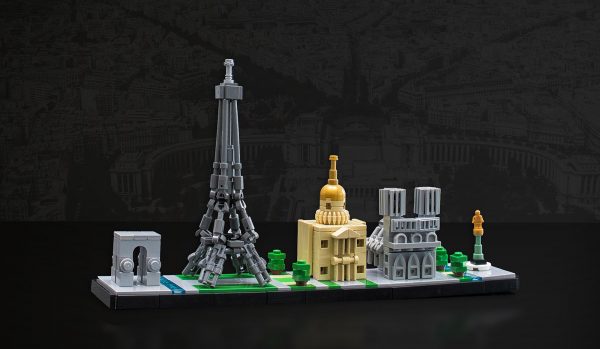
Paris Skyline, by Cecilie Fritzvold
Immediately recognizable despite its tiny scale, what's not to love about this Paris Skyline? I really like how closely it follows the style of the official sets.
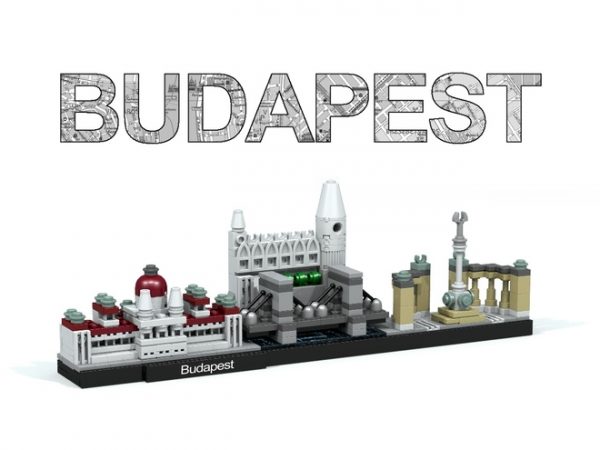
Budapest Skyline, by docbali
This is another excellent model that follows the style of the official sets very well. It's worth noting that this model is one of the first examples to layer a building behind a bridge for a more interesting composition, preceding the same effect which is used in the new 2017 sets.
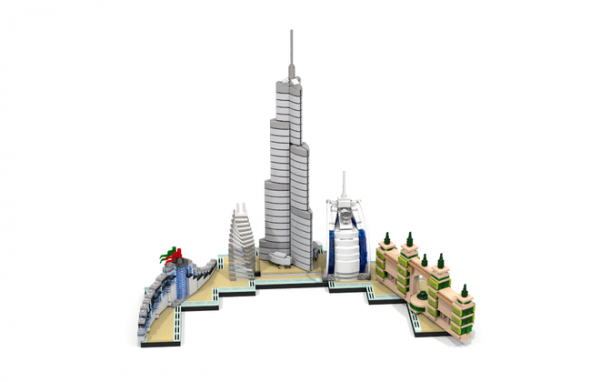
Dubai Skyline, by Anscott
While it is far too large and has an oddly shaped base, there is a lot to love in this Dubai skyline. It's interesting to see how different builders are expanding on the skyline concept.
P.S.Have you found or created an awesome Skyline model that isn't included on my pinterest page? If so, leave a comment below so I can add it to the collection!
You can post now and register later.
If you have an account, sign in now to post with your account.
Note: Your post will require moderator approval before it will be visible.


Now that the LEGO Architecture Skylines series is in it's second year, with a total of six sets released so far, We are seeing some amazing fan-made models in the style of the official sets.
I just wrote an article highlighting the very best of these custom models. (Before selecting my favorites, I created this Pinterest board where I collected all 24 custom Skyline models I've found so far.)
Paris Skyline, by Cecilie Fritzvold
Immediately recognizable despite its tiny scale, what's not to love about this Paris Skyline? I really like how closely it follows the style of the official sets.
Budapest Skyline, by docbali
This is another excellent model that follows the style of the official sets very well. It's worth noting that this model is one of the first examples to layer a building behind a bridge for a more interesting composition, preceding the same effect which is used in the new 2017 sets.
Dubai Skyline, by Anscott
While it is far too large and has an oddly shaped base, there is a lot to love in this Dubai skyline. It's interesting to see how different builders are expanding on the skyline concept.
You can see all seven of my favorite models at brickarchitect.com
Sincerely,
---tom
P.S. Have you found or created an awesome Skyline model that isn't included on my pinterest page? If so, leave a comment below so I can add it to the collection!