Jump to content
View in the app

A better way to browse. Learn more.

BRICKPICKER

A full-screen app on your home screen with push notifications, badges and more.

To install this app on iOS and iPadOS
  1. Tap the Share icon in Safari
  2. Scroll the menu and tap Add to Home Screen.
  3. Tap Add in the top-right corner.
To install this app on Android
  1. Tap the 3-dot menu (⋮) in the top-right corner of the browser.
  2. Tap Add to Home screen or Install app.
  3. Confirm by tapping Install.

Nearly 1000 labels to organize your growing LEGO Collection...

Featured Replies

  • Popular Post

For the past three years, I've created a huge collection of labels to help organize your LEGO bricks, and it now has nearly 1000 labels! 

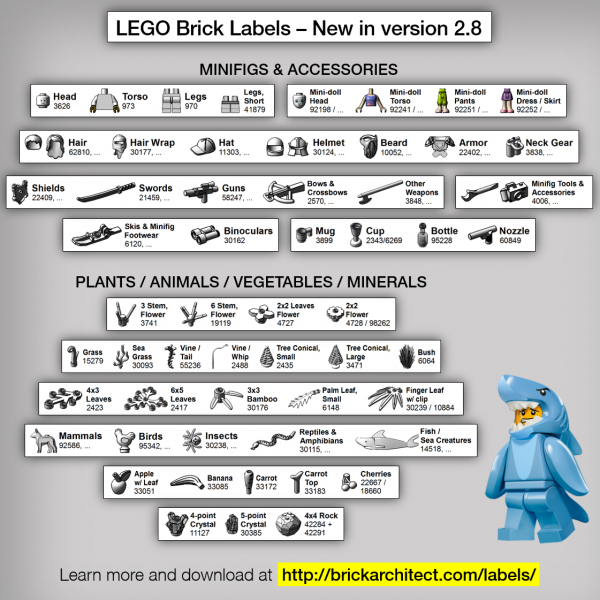
Lables_2_8-600x600.png

I just updated the LEGO 
Brick Labels collection to include 55 new bricks including Minifigures, Accessories, Animals, Plants, and more...

Download the latest version and learn more at http://brickarchitect.com/labels/

--- Tom Alphin


What Are 'LEGO Brick Labels'?
Organize your LEGO collection using beautiful labels you can print at home. With almost 1000 different labels, this is the most complete label collection designed exclusively for LEGO bricks.  LEGO Brick Labels were designed by Tom Alphin, Author of the bestselling book The LEGO Architect.

  • 10 months later...

I am in the beginning phases of reorganizeing my Lego collection. I have started breaking down old sets and parting out new ones. I have a combination set up using the Akro-mills system and the shoe box size sterilite bins. I am interested in your labels. I know they print out using a Brother printer but can they be printed out on a full size sticker page? 

Any thought about corresponding labels to bricklink lot types?

For example under your plant - whip vine, that is a minifig utensil under bricklink inventory, and the tail vine is an animal body part. I think bricklink's inventory does a very good job of part separation, and it'd be pretty easy to harvest all the categories. No need to reinvent the wheel!

It would be immensely useful for people with large bricklink stores or those who are already used to bricklink.  

Having pictures corresponding directly with correct lot / lot type / item number list would be excellent! 

If you have a label printer yourself, I bet you could sell sets of the labels as well, especially for those of us who would have no other use for a label printer. 

Edited by Muffin Cup

Join the conversation

You can post now and register later. If you have an account, sign in now to post with your account.
Note: Your post will require moderator approval before it will be visible.

Guest
Reply to this topic...

Recently Browsing 0

  • No registered users viewing this page.

Configure browser push notifications

Chrome (Android)
  1. Tap the lock icon next to the address bar.
  2. Tap Permissions → Notifications.
  3. Adjust your preference.
Chrome (Desktop)
  1. Click the padlock icon in the address bar.
  2. Select Site settings.
  3. Find Notifications and adjust your preference.