I am really excited that the Brick Loot team gave me an opportunity to design a model which was included in the November Brick Loot box. I jumped at the chance to expand on the narrative I started with my book 'The LEGO Architect' by creating a new model that explores a recent trend in Architecture.
LEGO Architecture model in November 2016 Brick Loot subscription.
The model I designed explores contemporary architecture trends, emphasizing projecting volumes, angular shapes, glass, and mixed materials. I call the model “@ Home”, because the front facade has a curving yellow shape that looks like an “@”sign.
You will find more information about the model, instructions, videos, and photos of early prototypes that I created along the way at:http://brickarchitect.com/brickloot/
You can post now and register later.
If you have an account, sign in now to post with your account.
Note: Your post will require moderator approval before it will be visible.


I am really excited that the Brick Loot team gave me an opportunity to design a model which was included in the November Brick Loot box. I jumped at the chance to expand on the narrative I started with my book 'The LEGO Architect' by creating a new model that explores a recent trend in Architecture.
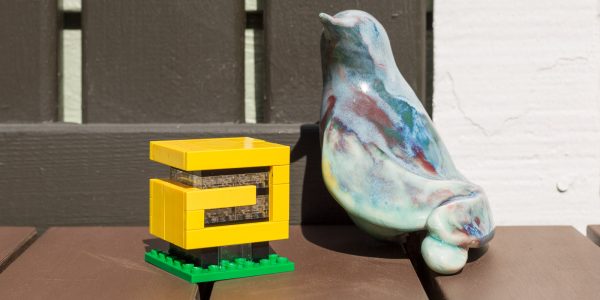
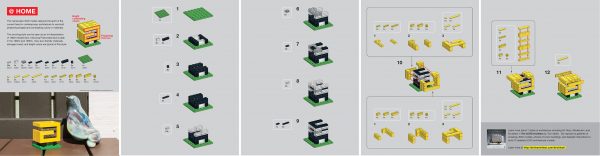
LEGO Architecture model in November 2016 Brick Loot subscription.
The model I designed explores contemporary architecture trends, emphasizing projecting volumes, angular shapes, glass, and mixed materials. I call the model “@ Home”, because the front facade has a curving yellow shape that looks like an “@” sign.
Detailed building instructions
(A video of the build steps is available at Youtube: https://www.youtube.com/watch?v=MzxIuxEig8I&feature=youtu.be )
You will find more information about the model, instructions, videos, and photos of early prototypes that I created along the way at: http://brickarchitect.com/brickloot/
Thanks,
Tom Alphin, Author 'The LEGO Architect'