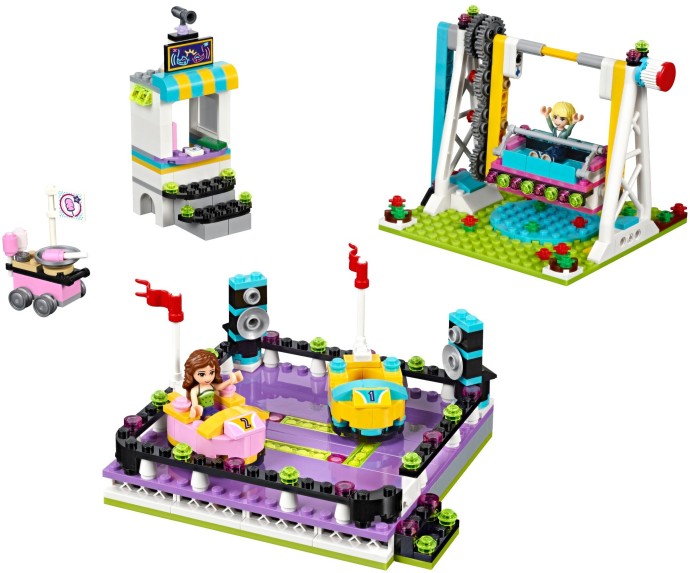
March 26, 20169 yr It seems some of the Friends "Theme Park" sets are hit and miss (Friends Roller Coaster - I wasn't impressed). This set doesn't look too bad...Of course I'll have to get 4 sets to make a decent bumper car ride. And I'll finally have use for those Joker bumper car poly bags!
March 26, 20169 yr I just wish this was a regular theme and not based in Friends crazy color world. Agreed. So much potential. Lost.
March 26, 20169 yr I'm not much of a MOC'er, however, I see tons of potential for my own Fairground theme. There's nothing unique in this set that I can't recreate (or make bigger). I'll definitely pick this up for myself and the kids, and then do some magical stuff to it. Investment wise - I don't see it sticking. I'm wondering if the Fairground Mixer and Ferris Wheel just aren't doing the numbers they were hoping, and they've decided to put what they've developed into Friends instead.
March 27, 20169 yr Author Perhaps the lavender base of the bumper car section is a bit much in terms of color but oddly enough the palette choice on everything else is not too far off from some theme park attractions. If anything getting a Top Spin ride plus a little cotton candy cart is sweet.
March 27, 20169 yr I'm going to want to make that bumper car area 4x the size. No rare parts so I should be able to do it in any color. Needs more Joker Bumper Cars.
March 27, 20169 yr I just wish this was a regular theme and not based in Friends crazy color world. I'm holding off on putting my money in the friend's theme park sets because 'one day' when the real theme park sets come out I won't have to sell the friends lolly coloured sets for a few cents.
February 24, 20187 yr finally a decent price. pretty much every target in my zone has this set marked down to $27.98 clearance before red card. getting to be last call with this target excluisve, sold out at shop at home.

 2
2
