New Elementary posted a link on their facebook page to a huge update of new parts which were recently added to the Brickset database. This includes completely new elements, and existing elements in new colors.
I also did some analysis to see which parts are most interesting for fellow LEGO Architecture enthusiasts, especially folks like myself who enjoy the LEGO Architecture Studio set.
I hope you find the new bricks interesting; I know I did. I'm especially interested in the new transparent plate with pin, which has a lot of potential uses.
You can post now and register later.
If you have an account, sign in now to post with your account.
Note: Your post will require moderator approval before it will be visible.


New Elementary posted a link on their facebook page to a huge update of new parts which were recently added to the Brickset database. This includes completely new elements, and existing elements in new colors.
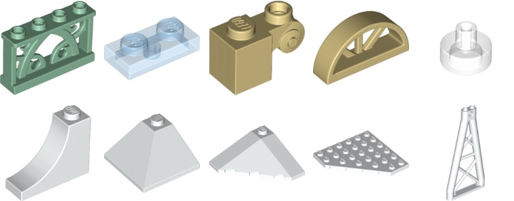
LINK: http://brickset.com/parts/new-03-06-2015
I also did some analysis to see which parts are most interesting for fellow LEGO Architecture enthusiasts, especially folks like myself who enjoy the LEGO Architecture Studio set.
I hope you find the new bricks interesting; I know I did. I'm especially interested in the new transparent plate with pin, which has a lot of potential uses.
---tom