
Jump to content
View in the app

A better way to browse. Learn more.

BRICKPICKER

A full-screen app on your home screen with push notifications, badges and more.

To install this app on iOS and iPadOS
  1. Tap the Share icon in Safari
  2. Scroll the menu and tap Add to Home Screen.
  3. Tap Add in the top-right corner.
To install this app on Android
  1. Tap the 3-dot menu (⋮) in the top-right corner of the browser.
  2. Tap Add to Home screen or Install app.
  3. Confirm by tapping Install.

Shop at Home Store Calendar and offers - January 2015

Featured Replies

Ok guys, did anyone else notice whether or not they earned VIP points on their >$75 purchase to get the flower cart?   My points are not showing, however the points I earned for a 2nd smaller purchase to use the January calendar coupon (minifig offer) did show up.


I'm hoping this was a mistake that can get fixed, or a delay on the system, and not that you have to choose either VIP points or promo.

  • Replies 86
  • Views 18.1k
  • Created
  • Last Reply

Top Posters In This Topic

Most Popular Posts

  • My tru had the elsa castle out yesterday.  They said they only got 6 in and I got the last one.  Was going to qfll but it looks like they are only selling for $65 shipped on ebay and my local craiglis

  • Courtesy of thebrickfan.com Higher resolution: >Link The January 2015 LEGO Store Calendar is now available and there are some very cool stuff happening. First is the Free Exclusive
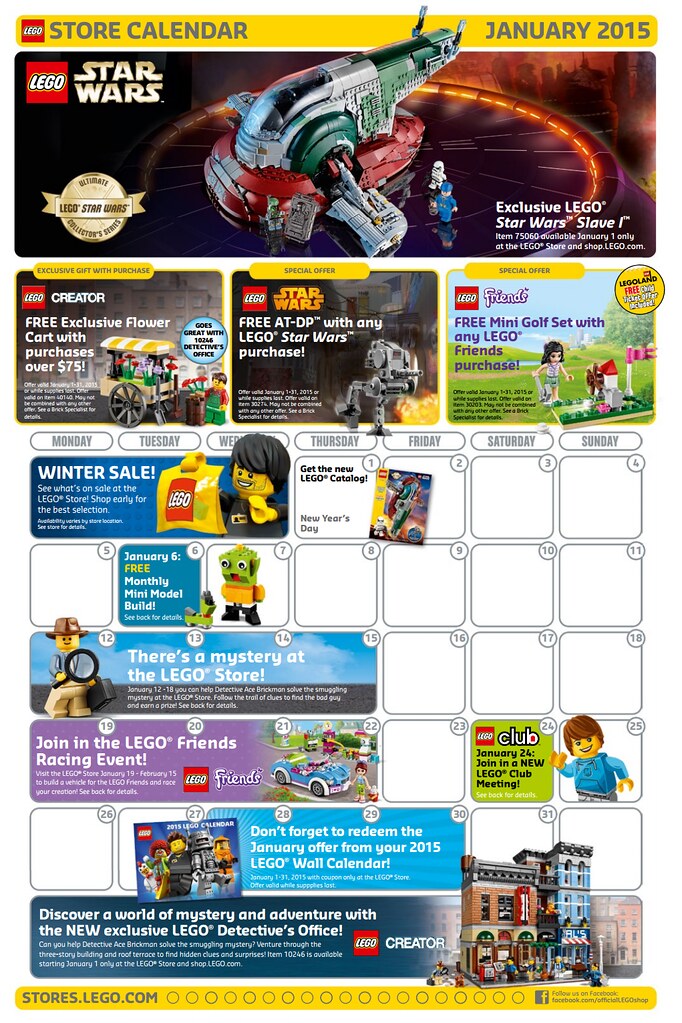
  • Something tells me if you spend $75 and get a Star Wars and a Friends item, you will get all 3 promos.

I'm thinking it may be a system delay as our store is having the same problem. The reason I say this was because when I ordered online it said you will earn XX points for this order.

If only I lived in Italy. Then I could take a 4 hour lunch break and go buy legos.


And you would even have time for a quick pizza with an espresso.

If only I lived in Italy. Then I could take a 4 hour lunch break and go buy legos.

There's no LEGO store in Italy. Closest ones in Austria or France. 4 hours in a private jet will get you there and back.

There's no LEGO store in Italy. Closest ones in Austria or France. 4 hours in a private jet will get you there and back.

Now you're talking! First class brick hunt.

Ok guys, did anyone else notice whether or not they earned VIP points on their >$75 purchase to get the flower cart?   My points are not showing, however the points I earned for a 2nd smaller purchase to use the January calendar coupon (minifig offer) did show up.


I'm hoping this was a mistake that can get fixed, or a delay on the system, and not that you have to choose either VIP points or promo.


I purchased Detective Office at a store on Friday, received the flower cart, and the points posted that night.

  • 2 weeks later...

Just out of curiosity, I ordered a PC mid month and did not receive the flower stand with it. Did these all sell out already?

Just out of curiosity, I ordered a PC mid month and did not receive the flower stand with it. Did these all sell out already?

yes...

Just out of curiosity, I ordered a PC mid month and did not receive the flower stand with it. Did these all sell out already?

For Canadian Shop@Home the flower cart ran out as early as January 5. So I stopped ordering online and have been going to the actual store. Flower cart was still available as of last Saturday.

Can anyone confirm that we qualify for the monthly freebies by ordering at LEGO Shop at Home? Also, for items that are backorder, do we get the freebie the month the item is shipped or the freebie of the month the order is placed? Thanks!

Join the conversation

You can post now and register later. If you have an account, sign in now to post with your account.
Note: Your post will require moderator approval before it will be visible.

Guest
Reply to this topic...

Recently Browsing 0

  • No registered users viewing this page.

Configure browser push notifications

Chrome (Android)
  1. Tap the lock icon next to the address bar.
  2. Tap Permissions → Notifications.
  3. Adjust your preference.
Chrome (Desktop)
  1. Click the padlock icon in the address bar.
  2. Select Site settings.
  3. Find Notifications and adjust your preference.
