Jump to content
View in the app

A better way to browse. Learn more.

BRICKPICKER

A full-screen app on your home screen with push notifications, badges and more.

To install this app on iOS and iPadOS
  1. Tap the Share icon in Safari
  2. Scroll the menu and tap Add to Home Screen.
  3. Tap Add in the top-right corner.
To install this app on Android
  1. Tap the 3-dot menu (⋮) in the top-right corner of the browser.
  2. Tap Add to Home screen or Install app.
  3. Confirm by tapping Install.

Reverse engineering LEGO Architecture 21023 - Flatiron Building

Featured Replies

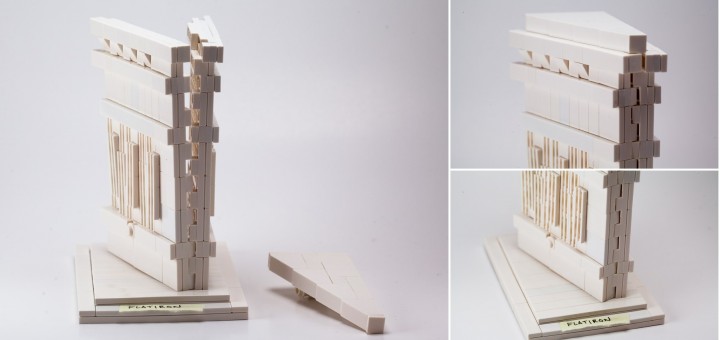
This set hasn't even been officially announced yet, but a photo of the box leaked online, and I've already taken some time to reverse-engineer some sections of the model, and done some analysis of the new parts. (Hint: New colors of existing parts!) So far, I predict that this will be a fun model with some nice parts.

flatiron_LEGO-720x340.jpg

LINK: http://tomalphin.com/2014/09/reverse-engineering-lego-architecture-21023-flatiron-building.html

Sincerely,
--- Tom Alphin

P.S. I have not shared the leaked official photos, but you can find them online with some searching.

This set hasn't even been officially announced yet, but a photo of the box leaked online, and I've already taken some time to reverse-engineer some sections of the model, and done some analysis of the new parts. (Hint: New colors of existing parts!) So far, I predict that this will be a fun model with some nice parts.

flatiron_LEGO-720x340.jpg

LINK: http://tomalphin.com/2014/09/reverse-engineering-lego-architecture-21023-flatiron-building.html

Sincerely,

--- Tom Alphin

P.S. I have not shared the leaked official photos, but you can find them online with some searching.

Nice! You definitely have an eye for all this Architecture stuff!

  • 5 months later...

Join the conversation

You can post now and register later. If you have an account, sign in now to post with your account.
Note: Your post will require moderator approval before it will be visible.


Guest
Reply to this topic...

Recently Browsing 0

  • No registered users viewing this page.

Configure browser push notifications

Chrome (Android)
  1. Tap the lock icon next to the address bar.
  2. Tap Permissions → Notifications.
  3. Adjust your preference.
Chrome (Desktop)
  1. Click the padlock icon in the address bar.
  2. Select Site settings.
  3. Find Notifications and adjust your preference.