There is a new feature available to those of you that may not have wanted to start from scratch and re-list all of your current eBay products. This feature will hopefully make that process a little faster. In the Products section of the Vendor admin areas, you will see a new link for "Import from eBay". Its a pretty simple and fast setup.
You will see an eBay Connect/Reconnect button that will bring you to eBay and ask for your permission for Brick Classifieds to get your listings. They basically pass us a token to allow us to list your items for you to select and import. It will show you all your current listings. If there are non LEGO related listings, you can keep those unchecked and it will only import the ones you want to import. You will also have the ability to select a small discount to your current pricing. If you would like to lower the price by 5% or even 10% it will adjust those prices on import.
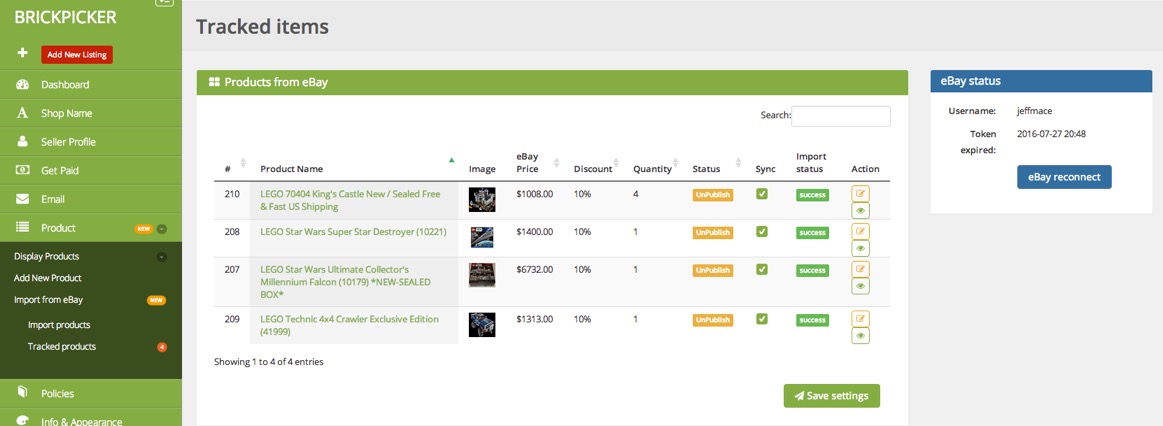
Once you select all your desired items to be imported, process them and you will then see all of them listed and ready to be edited and made live. All imported items default to the non active status. You will still need to add/adjust a few things to make sure it fits the Brick Classifieds format. It will import your Title, Description, Price, Quantity, condition (if available) and images. You will still need to select the category, enter tags and do shipping. If you are using stock photos on eBay, these will need to be turned into personal photos for Brick Classifieds. This has been going really well on the site, and we do not want to deviate from this.
Note: All my listings above are fake, just used for testings...
Hopefully this feature will encourage some of you that are just on eBay to import your listings here and continue to build the marketplace. If you are running into issues, please send me a PM and we will figure it out. Feedback is always welcome.
There is also a sync process setup to monitor your eBay listings. If it is sold on eBay, it will update your Brick Classifieds listings. It can subtract quantity or make your listing in-active.
You can post now and register later.
If you have an account, sign in now to post with your account.
Note: Your post will require moderator approval before it will be visible.


There is a new feature available to those of you that may not have wanted to start from scratch and re-list all of your current eBay products. This feature will hopefully make that process a little faster. In the Products section of the Vendor admin areas, you will see a new link for "Import from eBay". Its a pretty simple and fast setup.
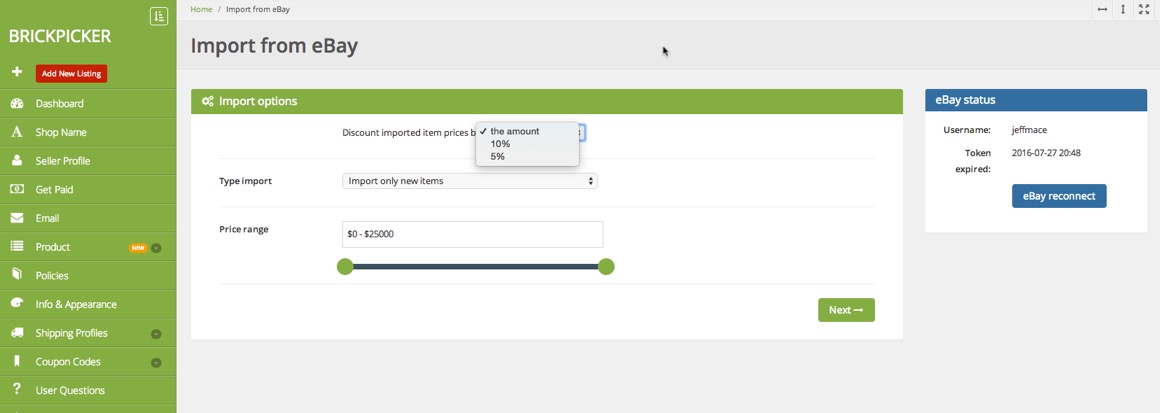
You will see an eBay Connect/Reconnect button that will bring you to eBay and ask for your permission for Brick Classifieds to get your listings. They basically pass us a token to allow us to list your items for you to select and import. It will show you all your current listings. If there are non LEGO related listings, you can keep those unchecked and it will only import the ones you want to import. You will also have the ability to select a small discount to your current pricing. If you would like to lower the price by 5% or even 10% it will adjust those prices on import.
Once you select all your desired items to be imported, process them and you will then see all of them listed and ready to be edited and made live. All imported items default to the non active status. You will still need to add/adjust a few things to make sure it fits the Brick Classifieds format. It will import your Title, Description, Price, Quantity, condition (if available) and images. You will still need to select the category, enter tags and do shipping. If you are using stock photos on eBay, these will need to be turned into personal photos for Brick Classifieds. This has been going really well on the site, and we do not want to deviate from this.
Note: All my listings above are fake, just used for testings...
Hopefully this feature will encourage some of you that are just on eBay to import your listings here and continue to build the marketplace. If you are running into issues, please send me a PM and we will figure it out. Feedback is always welcome.
There is also a sync process setup to monitor your eBay listings. If it is sold on eBay, it will update your Brick Classifieds listings. It can subtract quantity or make your listing in-active.
Thank you