Jump to content
View in the app

A better way to browse. Learn more.

BRICKPICKER

A full-screen app on your home screen with push notifications, badges and more.

To install this app on iOS and iPadOS
  1. Tap the Share icon in Safari
  2. Scroll the menu and tap Add to Home Screen.
  3. Tap Add in the top-right corner.
To install this app on Android
  1. Tap the 3-dot menu (⋮) in the top-right corner of the browser.
  2. Tap Add to Home screen or Install app.
  3. Confirm by tapping Install.

41102 - Friends Advent Calendar 2015

Featured Replies

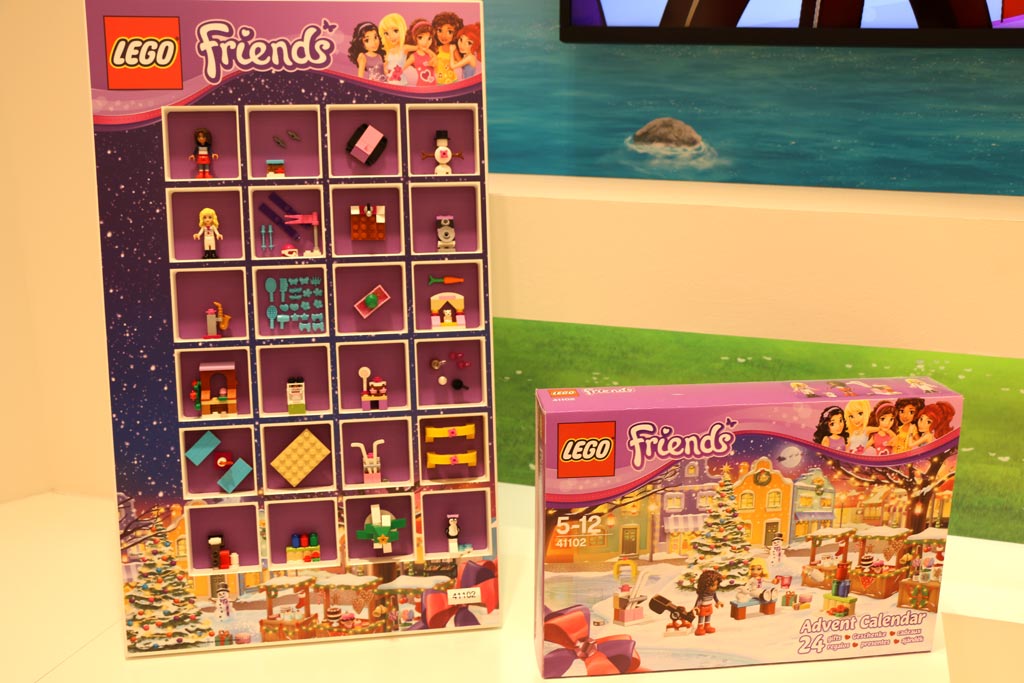
I always hate that one day that is nothing but combs and brushes and hair pieces.

  • Author

I see the inclusion of that same snowman build like the last. I suppose it can't be any better but perhaps a little different from year to year would be nice.

I always hate that one day that is nothing but combs and brushes and hair pieces.

I feel bad for the kid who opens up that day. Nothing to build and pretty much a slew of 'pieces' just about every Friends set has in bulk. Even the days with just a minidoll offer more of an actual build really.

I always hate that one day that is nothing but combs and brushes and hair pieces.

Re-stock day for your Heartlake Mall Beauty Shop ? :P

  • 7 months later...

Join the conversation

You can post now and register later. If you have an account, sign in now to post with your account.
Note: Your post will require moderator approval before it will be visible.

Guest
Reply to this topic...

Recently Browsing 0

  • No registered users viewing this page.

Configure browser push notifications

Chrome (Android)
  1. Tap the lock icon next to the address bar.
  2. Tap Permissions → Notifications.
  3. Adjust your preference.
Chrome (Desktop)
  1. Click the padlock icon in the address bar.
  2. Select Site settings.
  3. Find Notifications and adjust your preference.